





Your Grocery App Start your store

For wholesale vegetable & grocery traders

The rate list you write
every morning,
working for you all day.

Your shops, hotels and restaurants order from your own online store — at your rates, on their phones. You keep your customers, your prices and your margins.

Set up in a day. Nothing to pay until we have spoken.

Today's Rates Fresh · 6:00 AM
ItemUnitShopHotel
Tomato టమాటాkg2824
Onion ఉల్లిపాయkg3229
Potato బంగాళదుంపkg2623
Green Chilli పచ్చిమిర్చిkg5448
Coriander కొత్తిమీరbunch1210
Ginger అల్లంkg8679
Sent to 214 buyers this morning

Before this

You have done all of this
before seven in the morning.

The part that does the work

You already write the list.
Now it goes out on its own.

1

You set the rates

Once, in the morning. Shop rate and hotel rate on the same screen.

2

Every buyer gets it

A clean PDF price list lands in their inbox at the hour you choose — with their tier's rates, not somebody else's.

3

They order from it

One tap opens your store, already priced for them. No phone calls, no writing down quantities.

Two sides of one shop

What your buyer sees.
What you see.

These are real screens from real stores running on this today — not drawings of them. Customer names and phone numbers have been blurred out; nothing else has been touched.

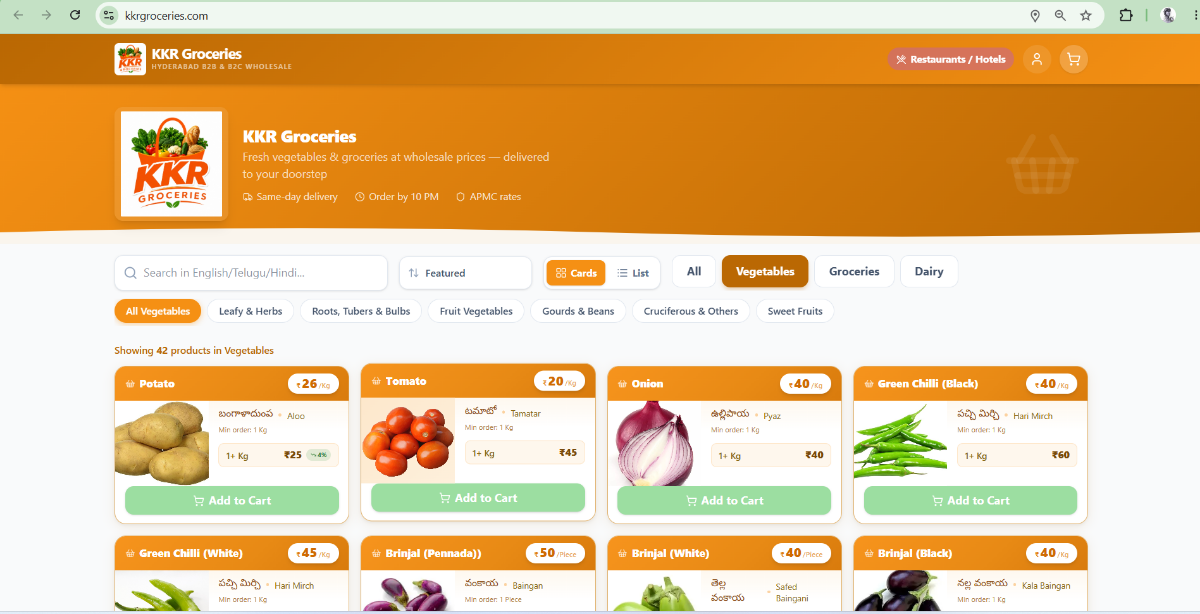
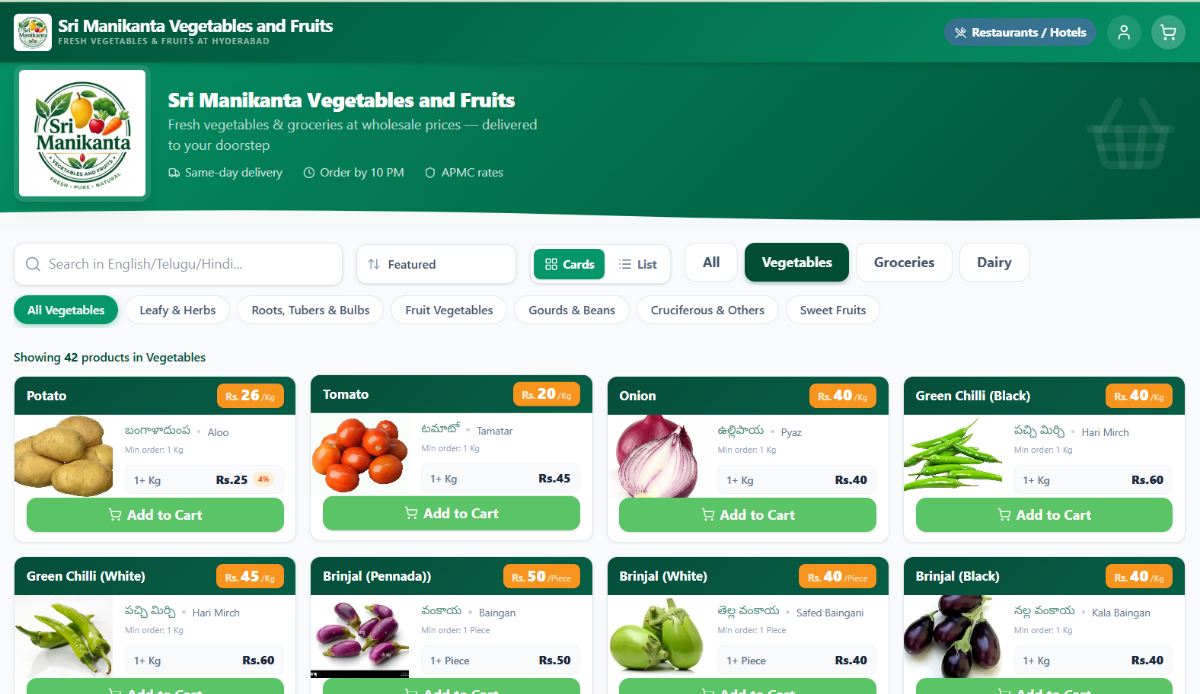
KKR Groceries' storefront: its own orange branding, a Restaurants and Hotels switcher, and vegetables priced per kilo Sri Manikanta's storefront: the same software in its own green branding with its own catalogue
Two shops, one piece of software. Same catalogue engine, same tier pricing, same three-language search — and they look nothing like each other, because each store is themed to its own brand. Your buyers arrive at your name and your address, not a marketplace.
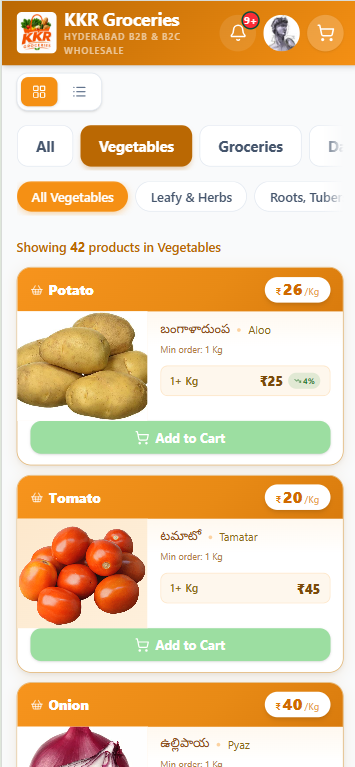
The storefront on a phone: product cards stacked, category chips scrolling, prices per kilo
And on the phone they actually use. Which is where nearly every one of your buyers will open it.
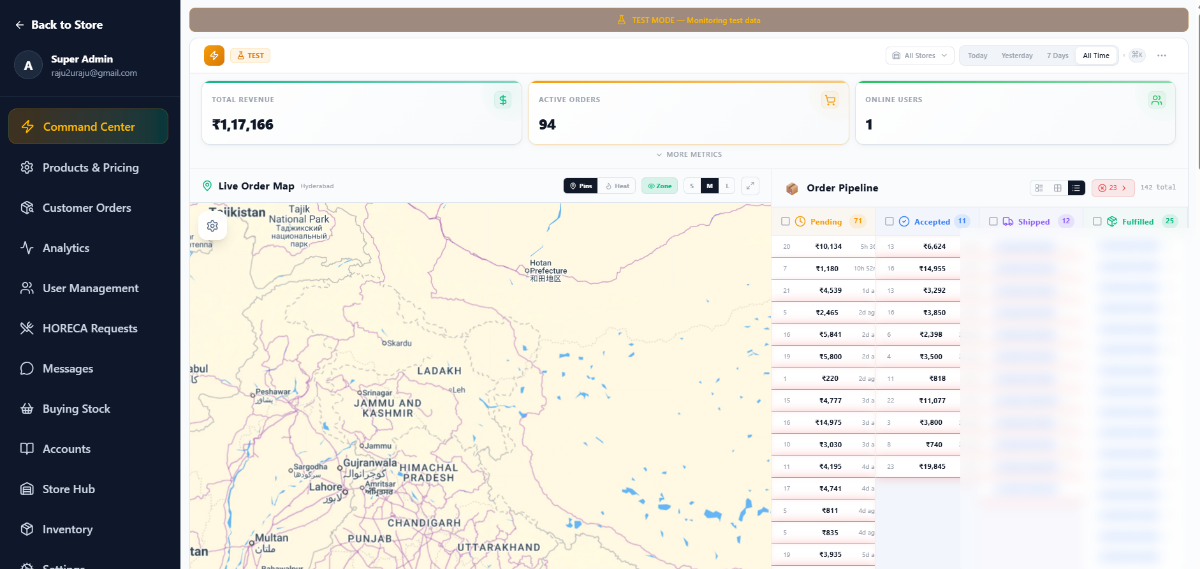
Command Center: revenue, active orders, a live delivery map and the order pipeline
The morning view. Money in, orders moving, delivery boys on the map, and the pipeline running left to right from pending to fulfilled.
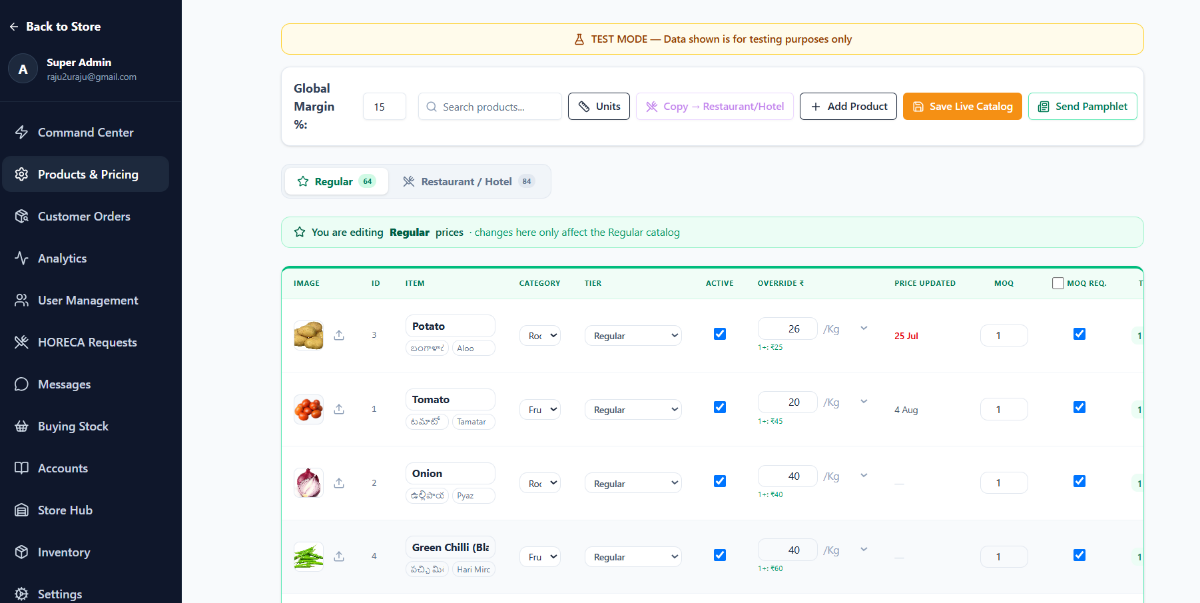
Products and Pricing: a Regular catalogue of 64 items and a Restaurant and Hotel catalogue of 84, with per-item overrides and slab prices
One catalogue, two price lists. Regular and Restaurant/Hotel side by side — 64 items and 84. Set a margin once, override any line, and Telugu and Hindi names sit on the product itself.
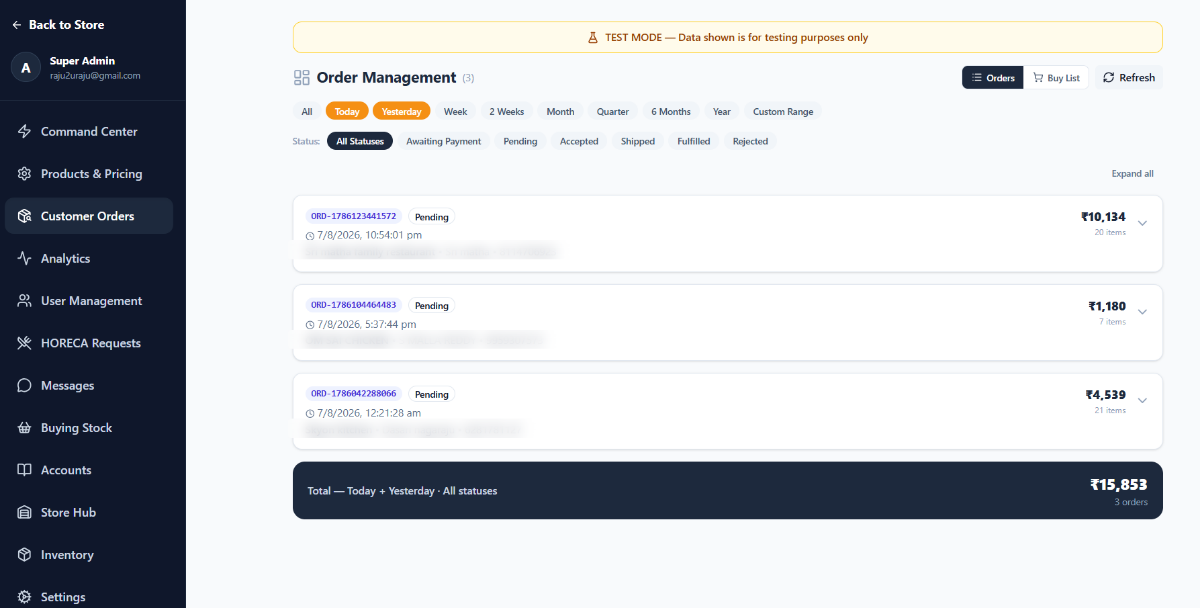
Order Management with date and status filters and orders listed with totals
Every order, filtered how you think. Today, yesterday, a week, a quarter — and by status. The Buy List totals it all for the mandi.
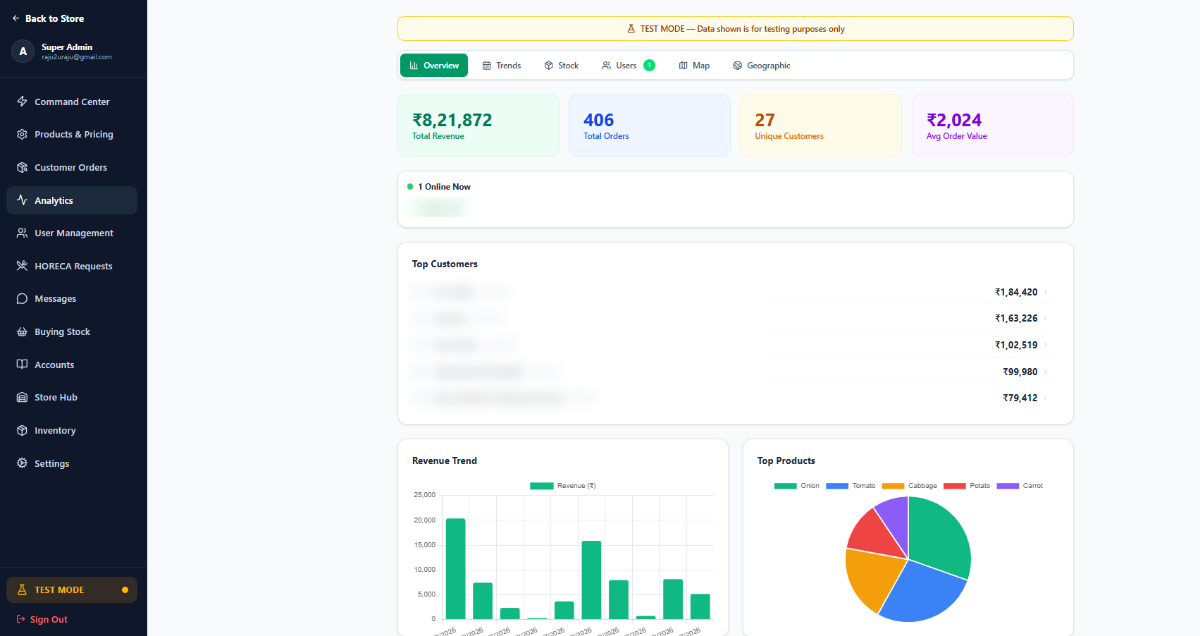
Analytics: total revenue, orders, unique customers, average order value, revenue trend and top products
What is actually happening. Revenue, order count, average order value, your best customers and your best-selling lines.
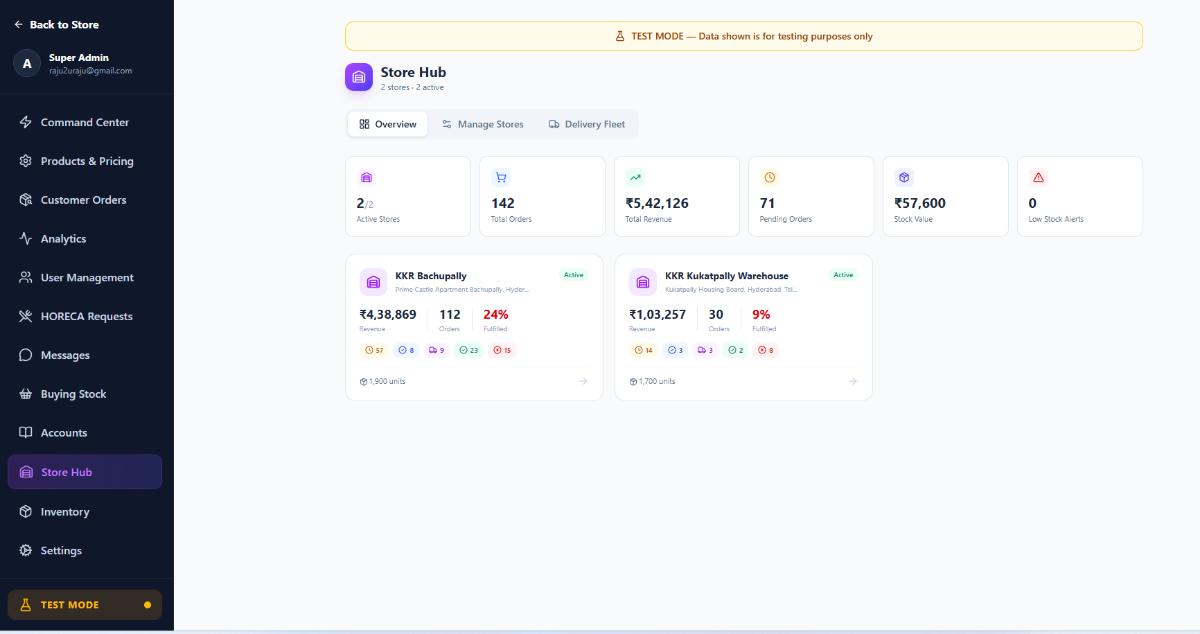
Store Hub comparing two active stores by revenue, orders and fulfilment
More than one godown. Each with its own stock, its own orders and its own delivery fleet — compared side by side, at no charge per branch.
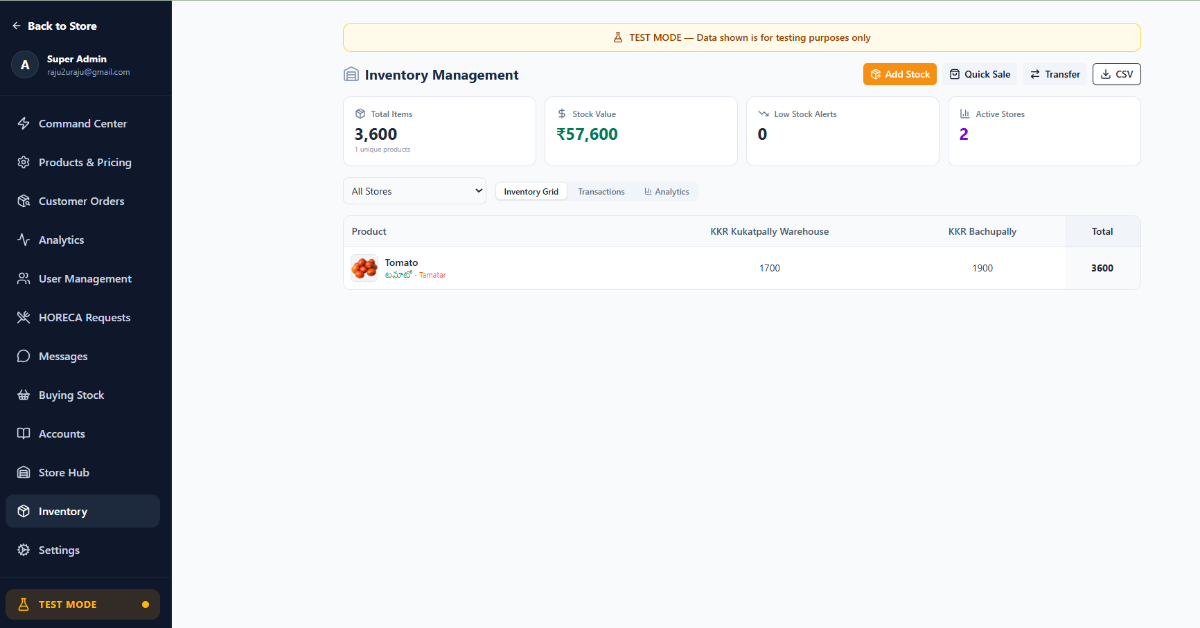
Inventory Management: stock per store, stock value, low-stock alerts, with transfer and CSV export
Stock, by warehouse. What is where, what it is worth, what is running out — and transfers between godowns.
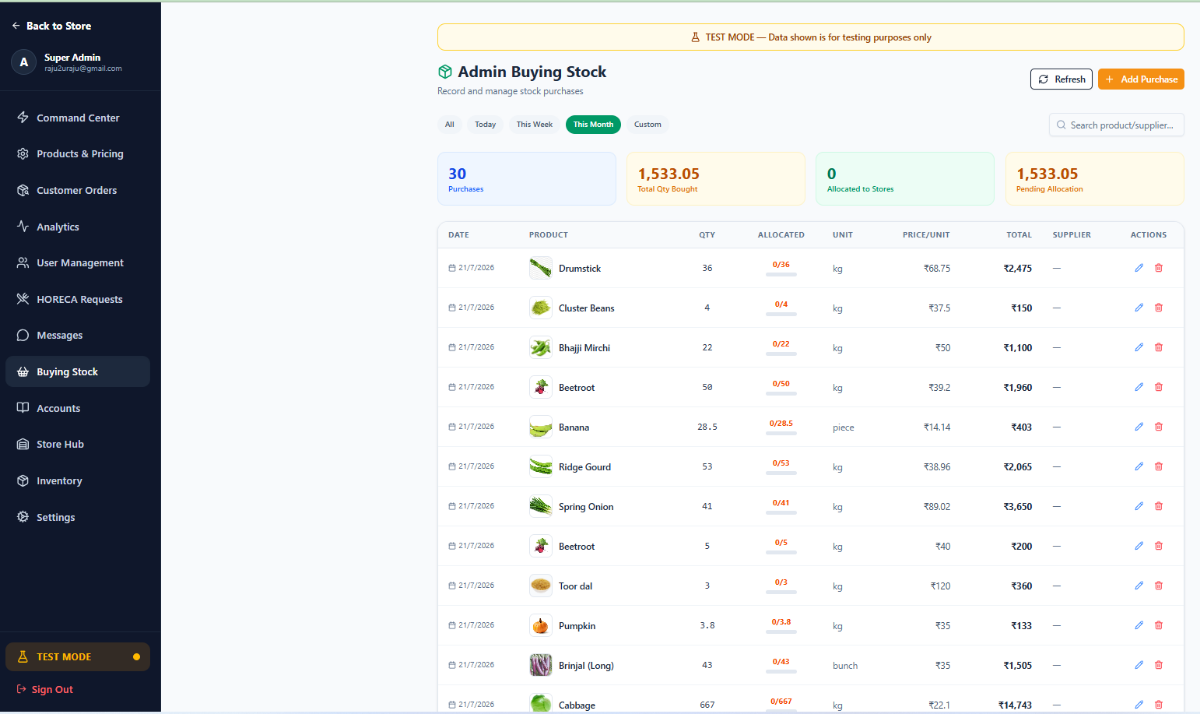
Buying Stock: purchases with quantity, unit, price per unit, total and allocation to stores
What you bought this morning. Rate, quantity and supplier, and how much of it has been allocated out to each store.
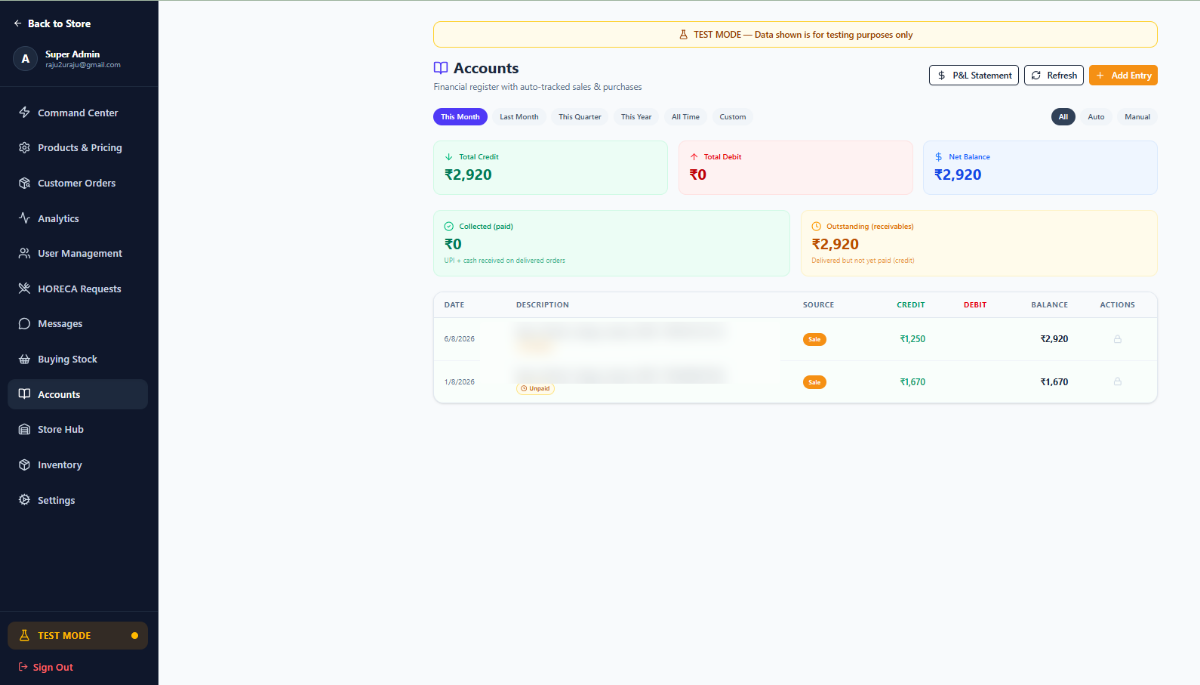
Accounts: total credit and debit, net balance, collected versus outstanding receivables, and a ledger
Your books, kept as you go. Collected against outstanding, a running ledger, and a P&L statement — not rebuilt at month end.
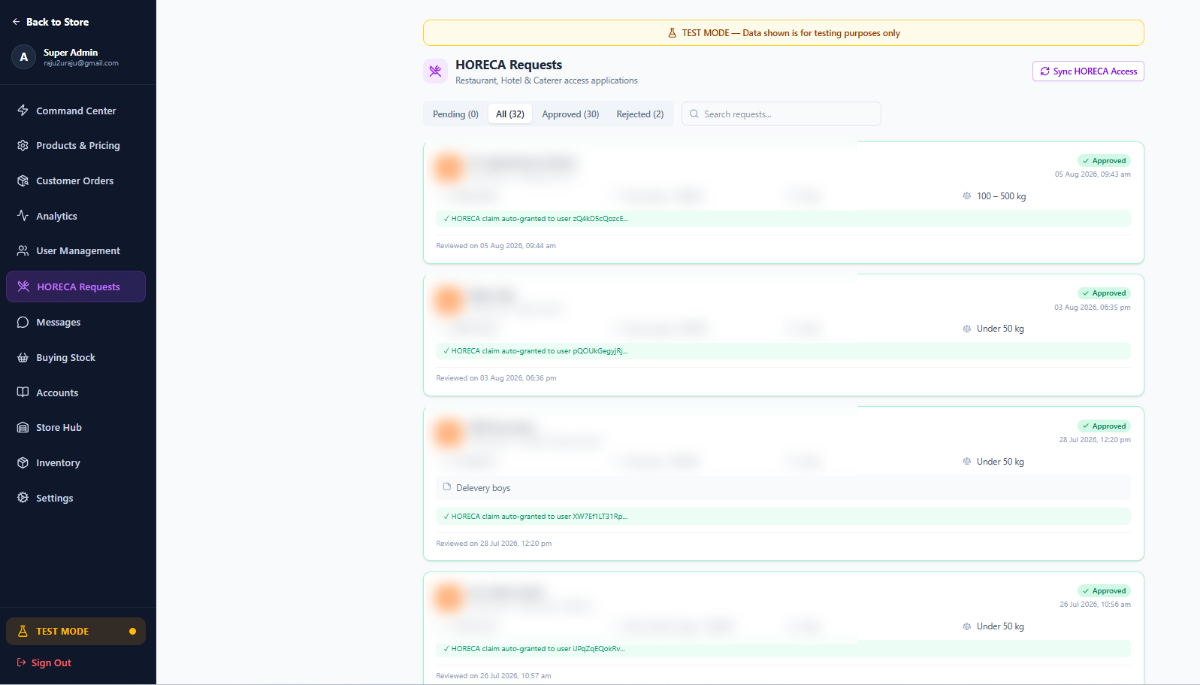
HORECA Requests: restaurant and hotel access applications with approve and reject
Restaurants apply, you approve. And hotel rates are granted automatically the moment you do.
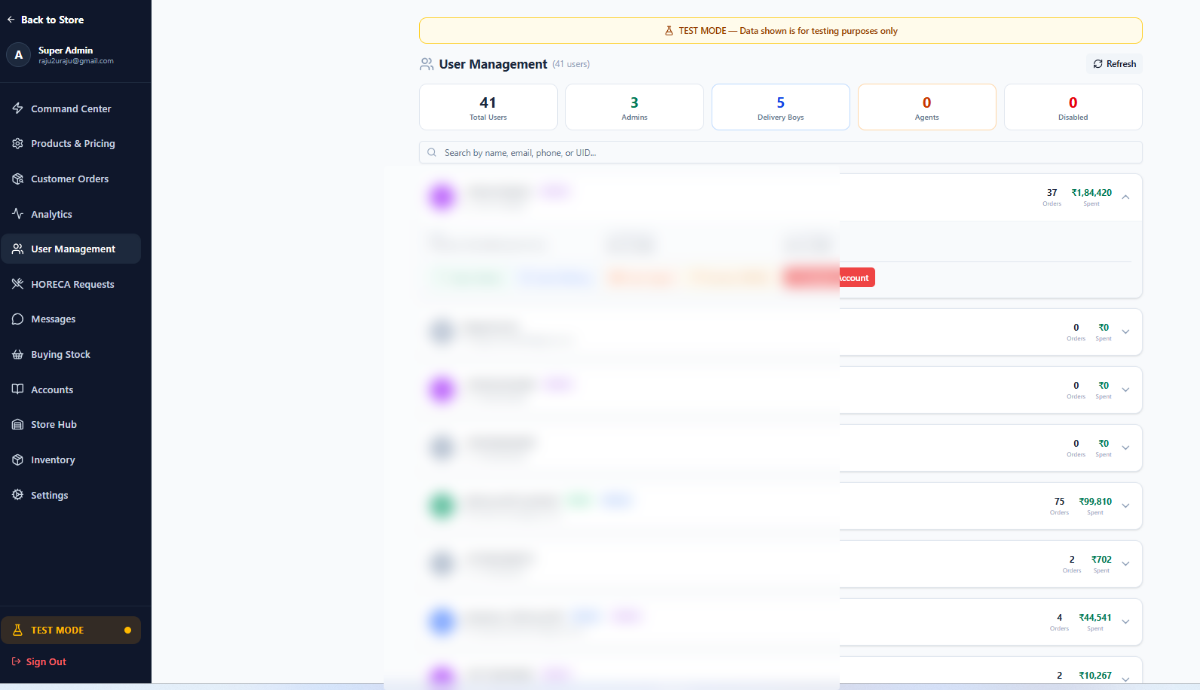
User Management: 41 users with admin, delivery and agent roles that can be granted or revoked
Your staff, with the access you give them. Admin, delivery and agent roles granted or revoked, and an account disabled the moment someone leaves.
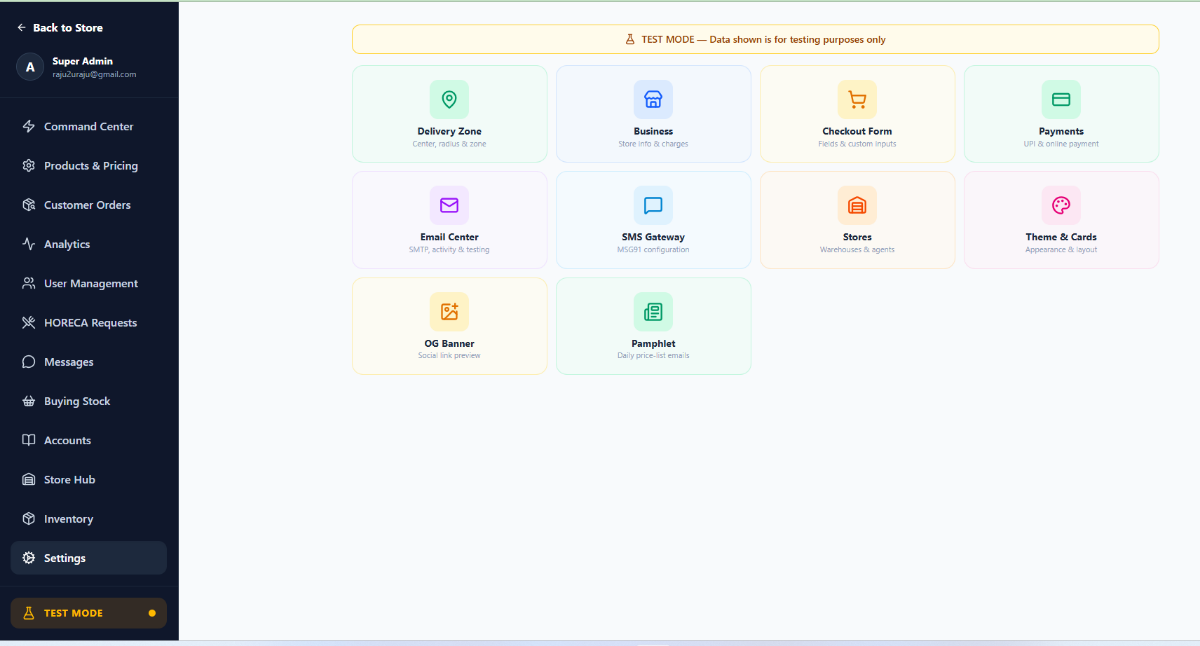
Settings: delivery zone, business details, checkout form, payments, email centre, SMS gateway, stores, theme, OG banner and pamphlet
And all of it is yours to set. Delivery zone, charges, checkout fields, payments, your own email sender, your own SMS gateway, the theme, and the daily rate list.

Every screen above is included. There is no tier that unlocks one of them.

Everything else

The rest of the shop, handled.

Where this came from

It was built to run one shop.
Then it ran a second.

KKR Groceries, Hyderabad

This software did not start as a product. It started because KKR Groceries needed to stop taking orders on WhatsApp at six in the morning. Everything on this page is the thing KKR actually runs on.

  • Its own storefront at kkrgroceries.com — not a stall inside somebody else's marketplace
  • Two price tiers on one catalogue — regular buyers and restaurants/hotels
  • Three languages in search — English, Telugu and Hindi, because its buyers use all three
  • Two warehouses, each with its own stock and its own delivery fleet
  • Same-day delivery, order by 10 PM, priced off APMC rates

See the live store →

Sri Manikanta Vegetables & Fruits

The second store was not a rebuild. It was provisioned — its own Google Cloud project, its own storefront, its own logo and catalogue, live in under an hour. That is the whole promise: what took years to build for the first shop takes an afternoon for the next one.

Two shops, not hundreds. We would rather show you both than tell you about numbers we have not earned yet — and if you are the third, you will be talking to the people who wrote it.

Price

One plan. Everything in it.

There is no Basic, no Standard, no “upgrade to unlock”. Every store gets the full product — both price tiers, every warehouse, the delivery app, the daily rate list, the lot.

Monthly

₹7,990/month

plus ₹25,000 one-time, to build and set up your store

Year one: ₹1,20,880

Start monthly

Save ₹30,880 in year one

Yearly

₹7,500/month

billed once a year — ₹90,000, with the ₹25,000 build included

Year one: ₹90,000 · after that ₹90,000

Start yearly

What it has to be worth

₹90,000 a year is about ₹247 a day. Supply a hundred buyers and that is ₹75 a month each — for a shop that is open to all of them at six in the morning without you sending a single message.

Now work it the other way. A marketplace takes a percentage; this takes a number. On ₹10 lakh of orders in a month, every 1% is ₹10,000 — more in one month than this costs in one. You know your own turnover. Do that sum once and the rest of this page is detail.

No commission on your orders. No per-branch charge. No paid add-on list.

No extra cost

Everything below is in the price.

Not a tier, not an add-on, not “contact us”. Every store gets all of it from the first day — including the things this market normally charges separately for.

Your storefront

  • Your own web address, name, logo and colours
  • Your own look — each store is themed to its own brand
  • Search in English, Telugu and Hindi
  • Categories and sub-categories you control
  • Card view and list view — the list is an order sheet
  • “Buy again” from a buyer’s last order
  • Opens in a browser — nothing for your buyer to install

Rates & catalogue

  • Two full catalogues — regular, and restaurant/hotel
  • Slab pricing — a different rate above a quantity
  • Global margin that prices the whole book at once
  • Per-item override when the market moves
  • Minimum order quantity, per item
  • Telugu and Hindi names on every product
  • Product photos, units, categories and tiers
  • “Price updated” date on every line
  • Copy the whole book across to the hotel tier in one action

The daily rate list

  • Emailed to your whole buyer list at an hour you choose
  • Priced per tier — nobody sees anyone else’s rate
  • Send-now as well as scheduled
  • Choice of layouts, and a public price-list page
  • Unsubscribe handled for you

Orders

  • Pipeline from pending to fulfilled, dragged along as it moves
  • Accept, revise quantities, or reject with a reason
  • Filter by day, week, month, quarter, year or any range
  • Buy list — everything ordered, totalled for the mandi
  • Live order map with delivery zones
  • Order alerts as they arrive

Delivery

  • A console for your delivery staff, on their own phones
  • Delivery OTP — the buyer’s code, entered on handover
  • Failed-delivery reporting with a reason
  • Delivery zone by centre and radius
  • Distance and cash-on-delivery charges
  • A fleet per warehouse

Money

  • GST invoices, on your letterhead
  • Accounts register, filled in as you trade
  • Profit-and-loss statement
  • What each buyer owes you, and what has been collected
  • UPI and online payment
  • Cash on delivery

Stock & buying

  • Purchases recorded with supplier, rate and total
  • Allocation of what you bought out to each warehouse
  • Stock per store, and the value of it
  • Transfers between warehouses
  • Low-stock alerts
  • Quick sale at the counter
  • Export to CSV whenever you want it

Your buyers

  • Every buyer, what they ordered and what they spent
  • Restaurant and hotel applications, approved by you
  • Hotel rates granted automatically on approval
  • Messages with buyers, in the app
  • Top customers, top products, revenue trend

Your people

  • Staff accounts with roles you set
  • Admin, delivery and agent access, granted or revoked
  • Disable an account the moment someone leaves
  • Sign-in by phone — no passwords to lose

More than one shop

  • As many warehouses as you run — no charge per branch
  • Each with its own stock, orders and delivery staff
  • Compared side by side on one screen

Settings you control

  • Business details and charges
  • What the checkout form asks for
  • Your own email sender, and your own SMS gateway
  • Appearance and card layout
  • The preview image when your link is shared
  • Test mode, so you can try anything without touching real orders

And underneath all of it

  • Your own Google Cloud project — not a row in a shared table
  • Your own database, isolated from every other store
  • Nightly backups
  • Unlimited buyers, orders and products
  • Every update, as it ships, at no extra cost

Straight answers

The questions everyone asks.

What is the ₹25,000 for?
  • Your own Google Cloud project and database — created for you, not a row in a shared table
  • Your storefront, with your name, your logo and your own address
  • Your catalogue loaded — your items, your units, your rates
  • Both price tiers set up — shop rates and hotel rates, off your margin
  • Your warehouses and delivery staff entered, each with its own stock
  • Your people shown how to run it, on a call, until orders are going through

Live within a week of the call. Charged once — and not at all on the yearly plan.

Do you take a cut of my orders?

No. Not a commission, not a percentage, not a per-order fee. You pay the plan and nothing else — that is the entire reason to have your own store instead of a stall on somebody else's marketplace.

Whose customers are they?

Yours. Your buyers come to your address, see your name, and their details sit in your store. We do not market to them and we do not sell the list.

Is my data mixed in with other shops'?

No, and this is unusual enough to be worth saying plainly: your store gets its own Google Cloud project and its own database. There is no shared table with other vendors' rates and customers in it, so there is nothing for a mistake in someone else's store to leak into.

Can my hotel buyers see the shop rates?

No. Each buyer only ever sees their own tier. A restaurant signs in and every price on the screen is the hotel rate; a kirana sees the shop rate. The rate list that goes out by email is priced per tier the same way.

Do my buyers have to install anything?

No. Your store opens in the browser they already have, from a link you send on WhatsApp. Nothing to download, nothing to sign up for before they can see your rates.

Do I need a computer?

No. The counter screens run in a phone browser — the same ones shown above. Most of the daily work is setting rates and accepting orders, and both are built for a thumb.

How long before I am taking orders?

The store itself is built in under an hour. The part that takes time is your catalogue and your rates, which we do with you on a call — usually the same week you ask.